 Obiz Solutions
GoAccess Dashboard — automated multi-site traffic tracking
GoAccess Dashboard is an automated system that runs daily, aggregates
traffic across multiple sites (starting with obiz-solution.com,
growing to cover others like vuecs.com), and serves a single dashboard at
goaccess.obiz-solution.com — password-protected, no need to open the AWS
Console just to check numbers.
Architecture
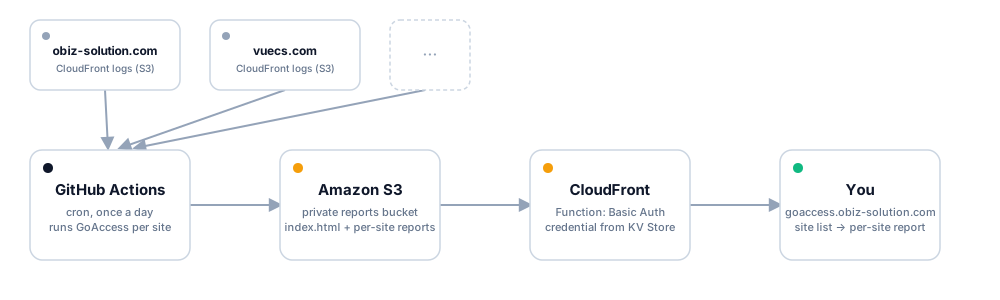
- Each source site (
obiz-solution.com,vuecs.com…) already has CloudFront access logs enabled, writing to its own S3 bucket. - GitHub Actions in the
goaccess-dashboardrepo runs on a schedule (cron, once a day) — not triggered by a code push, since the goal is fetching fresh data, not deploying new code. - For each site declared in
systems.json, the workflow syncs the latest logs from that site’s bucket, runsgoaccessto produce a per-site HTML report, then builds anindex.htmllisting every site. - The whole output is synced to a separate private S3 bucket
(
goaccess.obiz-solution.com), through the same kind of OIDC role as the main site — no stored access keys. - CloudFront sits in front of that bucket, with a CloudFront
Function running at the Viewer Request stage to check HTTP Basic
Auth — wrong or missing credentials return
401right at the edge, never even reaching S3.
Basic Auth without a server
Since the whole stack is still a static site (S3 + CloudFront), there’s no
server around to check a password the traditional way. The fix: a
CloudFront Function — a tiny bit of JS that runs directly at the edge
location, comparing the request’s Authorization header against an
expected value. That value (a Basic <base64> string) lives in a
CloudFront KeyValueStore — set through the AWS Console, never
committed to git — keeping the credential entirely out of the source code.
systems.json — an extensible config
[
  { "name": "obiz-solution.com", "logBucket": "obiz-solution.com-logs", "logPrefix": "cf-logs/" },
  { "name": "vuecs.com", "logBucket": "vuecs.com-logs", "logPrefix": "cf-logs/" }
]
Adding a new site is just one more line (as long as that site also has CloudFront logging enabled with the same agreed 33-field format) — nothing in the workflow or script needs to change.
Why once a day, not real-time
CloudFront delivers logs in batches, not instantly, and the goal here is spotting traffic trends, not real-time monitoring — running once a day is plenty fresh, keeps Athena/GoAccess costs near zero, and avoids paying for CloudFront real-time logs (which use Kinesis and cost continuously).